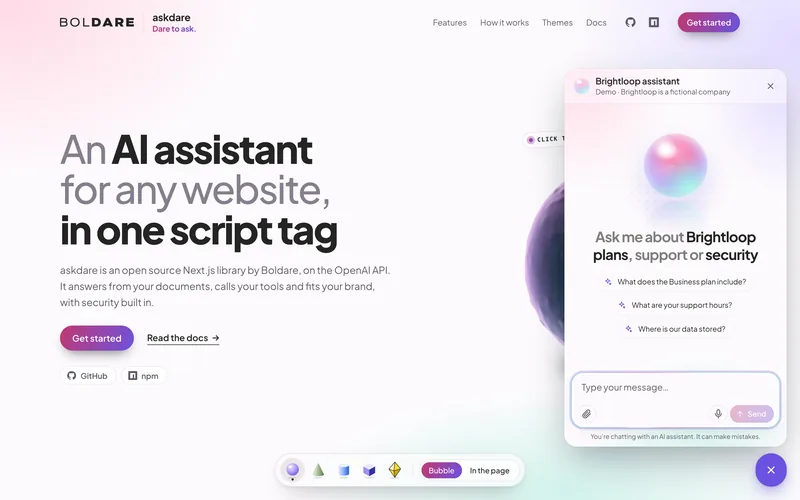
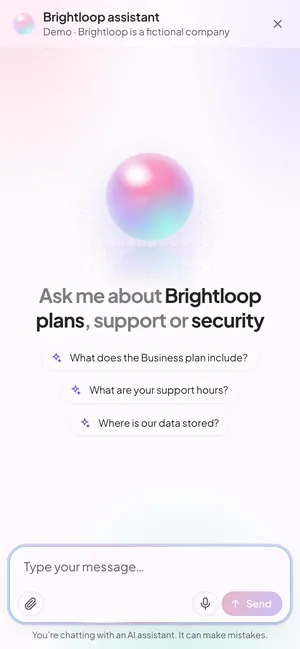
A chat on your website that answers customers from your own documents, at any hour, with links to the sources. Plus assistants for your team and on WhatsApp. With cost limits and security from day one.
answers from your docsdaily cost limita human when neededno chat subscription
Who it’s for
When a chatbot pays off.
The same questions every dayPrices, opening hours, delivery, terms. Your team answers them by hand, again and again.
Questions come in after hoursCustomers ask in the evening and at the weekend, and wait until someone is back at work.
Answers are buried in documentsPrice lists, terms, guides and FAQs exist, but nobody wants to read twenty pages to find one answer.
Your team hunts for informationPeople ask each other where a document is or what the procedure says, instead of finding it in a minute.
What you get
What you get in a chatbot.
We start in one place, usually your website or your team’s knowledge. Most often:
A chat on your website
With askdare, my open-source library, one line of code adds the chat to any website. Each page loads about 3 KB of it, and the rest only when someone opens the chat, so your website stays fast.
Answers from your documents
Price lists, terms, guides and the pages of your website go into a knowledge base (RAG). Every answer links to its source, so the customer can check it.
Costs under control
Daily budgets per bot and per IP address, message limits and an off switch. When the budget runs out, the chat stops answering instead of running up your bill.
Security from day one
A public chat is a place where anyone can write to the model at your expense. I plan for misuse using the OWASP guidance for LLM applications, and the chat gets access only to what it needs.
Handover to a person
When a question is tricky or the customer asks for a person, the assistant passes the conversation to your team with the full context (human in the loop).
Assistants for your team
An assistant that finds answers in your internal documents and procedures, with clearly defined permissions.
Assistants on WhatsApp
Customers ask on WhatsApp and get answers from your data. I have built WhatsApp assistants that answer questions about loads, sales and purchases from a company’s own data.
Ratings that show the gaps
Customers rate answers with a thumbs up or down and can add a comment to a weak one. You see straight away what is missing from your documents.
How we work
A working chat on your documents.
First a working chat on your documents, tested on the questions your customers really ask. We widen it once the answers are right.
I wrote the libraryaskdare is my open-source AI chat library: I designed it and wrote it from the first line. If the chat needs adapting to your business, the person who knows it best does it.
AI assistants shipped for clientsSince 2023 I have built AI assistants for clients, including WhatsApp assistants that answer from a company’s own data: first with RAG on LangChain, then on OpenAI with a knowledge base.
An honest “you don’t need one”If a clear FAQ page would do the job, I’ll tell you on the first call.
Yours, with no subscriptionThe code, the configuration, the knowledge base and the AI provider account are yours. You pay for model usage and hosting, not a monthly chatbot fee.
An AI chatbot is a chat window on your website that answers visitors’ questions in plain language. A good one answers from your own documents, such as price lists, terms and guides, links to its sources and hands tricky questions to a person. What it can and can’t do is explained in An AI chatbot on your website.
How does the chatbot answer from my documents?
It uses RAG (retrieval-augmented generation). Your documents are split into fragments and indexed; for each question the chatbot first finds the most relevant fragments, then the language model writes the answer based on them. That is why it can show its sources. More in An AI assistant that answers from your documents.
How much does an AI chatbot cost?
There are two parts: building it and running it. Building depends on the scope: how many documents, which integrations (for example checking an order) and which channels, such as WhatsApp. Running costs are mostly AI model usage, which grows with the number of conversations, the length of the questions and answers (tokens) and the model you choose, plus hosting. A daily budget caps the usage, so there are no surprises. You get a clear quote after a 30-minute call.
What happens to our data?
Only the documents you choose go into the knowledge base, and the chat gets access only to what it needs. Customer messages are sent to the AI model provider to generate answers, so before launch we agree what data the chat may receive and go through the provider’s data terms together. Public documents are the simplest start; an internal assistant gets clearly defined permissions.
Which AI model do you use?
I usually build on OpenAI models, and askdare runs on the OpenAI API. I choose the model for the job, balancing answer quality, speed and cost. If your company has already approved a specific provider, tell me on the first call and we’ll plan around it.
Will the chatbot make things up?
It can, like any language model, so I design against it. The chatbot answers from your documents and shows its sources, is told to say when it doesn’t know, and offers contact with your team instead of guessing. Before launch we test it on real questions, and after launch the ratings show weak answers. More on AI hallucinations.
Can the chatbot hand a conversation to a person?
Yes. When a question is tricky or sensitive, or the customer asks for a person, the chatbot passes the conversation to your team with its context, for example by e-mail or in the tool your team already uses. We agree the handover rules before launch. More in AI in customer service.
Which languages can it answer in?
Modern language models understand and answer in many languages, so customers can usually ask in their own. If your documents are in one language and customers write in another, we test those answers before launch.
Can someone abuse the chat and run up my bill?
That is a real risk with any public chat, so the limits come first: daily budgets per bot and per IP address, message limits and an off switch. When the budget runs out, the chat stops answering instead of running up your bill. More in AI agent security in plain English.
How long does it take to launch an AI chatbot?
With askdare it takes about 15 minutes from install to a working chat. A chatbot ready for your customers takes longer: preparing the documents, testing on real questions, limits, handover and your look. You usually see a demo on your documents after 1–2 weeks.
Chatbot or AI agent?
A chatbot answers questions; an AI agent also takes actions in your systems, such as checking an order or creating a ticket. Many projects start with a chatbot and add one or two safe actions later. The difference is explained in Chatbot or AI agent?
Open-source chat or a chatbot subscription?
A subscription tool is quick to start, but you pay every month and your setup lives on someone else’s platform. An open-source chat such as askdare has no licence fee and the code stays with you; you pay for model usage and hosting. Both are compared in Open-source chat widget or chatbot subscription?
Can the assistant work on WhatsApp?
Yes. I have built AI assistants on WhatsApp that answer customers’ questions from a company’s own data. More in A WhatsApp AI assistant for business.
Who owns the chatbot?
You do. The code, the configuration, the knowledge base and the AI provider account belong to you, and askdare is open source under the MIT licence. Another developer can take it over at any time.